
Can I make changes to my application after I have submitted it?
ARIeS will not generally allow you to make changes to an application once you have certified and submitted it. However, in some cases a search committee may be amenable to updating materials.
If you would like to request an update to your application, email the administrator in charge of the search. Look in your confirmation email for contact information.
Instructions for updating your application
Instructions for updating your application
You will require permission from the search administrator to access and update your application. Contact information for the search administrator can be found in your application confirmation email.
If you have received permission to update your application, log into the applicant portal.
From the navigation panel on the left, select Your Application.

In the Completed Applications section, find the application you wish to change and click on the Edit link.

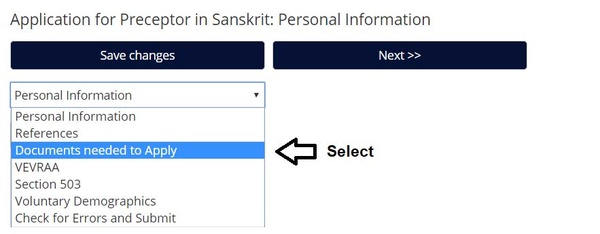
From the dropdown menu, select "Documents Needed to Apply" and press the red Go button.
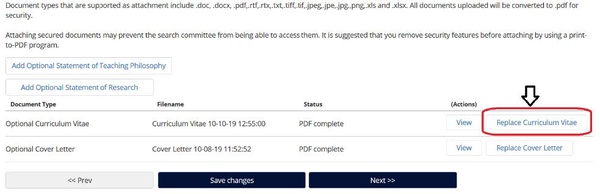
Select the existing document by clicking on the "Replace [document name]" button next to the relevant document.
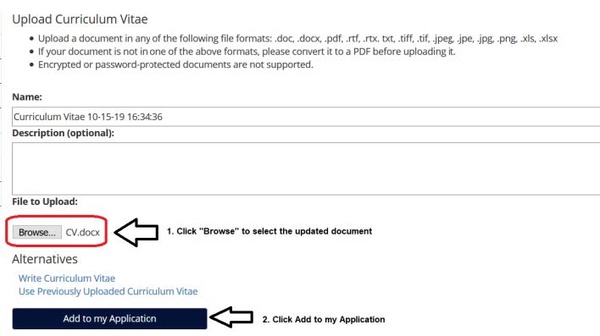
Click the Browse button to select the revised document from your computer, and click "Add to my Application" to upload it.
From the dropdown menu, select the References section, and click the red GO button.

VERY IMPORTANT:
You must completely delete the reference you wish to change, and then re-enter it with the correct information. Although the system will allow you to edit individual fields, this can potentially damage your application submission.
Since you will be deleting the reference and re-entering it, you may wish to do a screenshot to preserve the information that you will be re-entering.
Click the "Remove entry?" button at the bottom of the reference and press Save Changes.

Click the "Add Reference Entry" button, under the last reference entry. This will open a blank reference entry which you can populate with the correct information for the reference. Enter the complete updated reference entry with the corrected information and press Save Changes.

Once you have made all the desired edits, select "Check for Errors and Submit" from the dropdown menu and click the red Go button.

Click the "Certify and Submit" button.

Click the checkbox to certify you have read and agreed with the statements, and press "Submit this Application."

Your corrected application has now been re-submitted.